
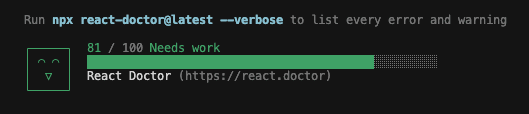
I treat my portfolio like production code, so I run a static audit across it the same way I would across a client codebase. React Doctor is a command-line tool that scans a React project and scores it out of 100 across security, performance, correctness, and architecture. It flagged twenty issues on this site. Fixing them was the easy part. The work that matters is deciding which findings are real, which are the tool misreading the framework, and which I am choosing to live with on purpose.
Here is how that played out.
The supply-chain gap that never shows in a green build
The most valuable finding had nothing to do with React. This project uses pnpm, and the audit pointed out how much of its supply-chain hardening I had left on the defaults. pnpm already refuses exotic transitive dependencies out of the box, but on the version this project runs it does nothing about release age. By default it installs the newest version of a package the moment it is published. That is the window attackers aim for. Hijack a popular package, push a poisoned release, and it lands in builds everywhere before the registry pulls it a few hours later.
So I tightened the defaults and pinned the rest explicitly:
# pnpm-workspace.yaml
minimumReleaseAge: 10080
trustPolicy: no-downgrade
blockExoticSubdeps: true
minimumReleaseAge: 10080 stretches the hold to seven days, well past the lifespan of most malicious publishes, and because I set it explicitly pnpm enforces it in strict mode: it fails the install rather than quietly resolving to a too-new version. trustPolicy: no-downgrade is the part that isn't a default. It fails the install if a package's trust level drops, say a previously verified publisher now shipping with no provenance. blockExoticSubdeps: true just pins that existing default so it cannot regress. Nothing on the site looked broken without any of it. Supply-chain exposure never does, which is exactly why it belongs in an automated check rather than a manual glance.
Trimming the animation bundle
Reveal, my scroll fade component, runs across the whole site and was importing the full motion package. That ships the entire animation engine, around 34kb, to render one fade and a slide. On a component used this widely, that weight is worth reclaiming.
Before:
import { motion } from 'motion/react';
// the full ~34kb animation engine, on every page Reveal touches
After:
import { m } from 'motion/react';
// plus one <LazyMotion features={domAnimation}> near the root
m is the same API as motion with nothing preloaded. LazyMotion then loads only the feature set you name. For these fades that is domAnimation, which lands around 18kb against the original 34, close to half the weight for the same animation.
The catch with LazyMotion is that it loads only what you hand it. Reveal triggers on scroll through whileInView, and if the loaded feature set lacks viewport detection, the animation simply stops firing with no error to tell you. I checked the installed package before shipping: domAnimation includes the inView feature, so the reveals still run.
The link that did not need a click handler
React Doctor flagged a table-of-contents link for calling preventDefault. The rule's instinct is sound. An <a> whose click handler cancels its own default is often a button wearing the wrong tag. Its prescribed fix, swapping the anchor for a <button>, was the wrong tool here. A button would strip the in-page navigation semantics and the no-JavaScript fallback, which hurts keyboard and reader-mode users rather than helping them.
The real fix was neither keeping it nor rewriting it. The handler existed only to add a smooth scroll with an offset for the sticky header, and the stylesheet already does both: scroll-behavior: smooth with a prefers-reduced-motion opt-out, and scroll-margin-top on every heading. The click handler was dead weight. I deleted it. The plain <a href="#heading"> now scrolls smoothly to the right spot on its own, works with JavaScript off, and the warning is gone. The tool pointed at a real smell. The canonical fix missed, and the right one was less code.
One component per file, even the tiny ones
It flagged my MDX setup for exporting non-components beside components, which breaks Fast Refresh during development. Two small renderers, a link and an inline code element, were living in the same file as the hook that registers them. I moved each into its own file. Fast Refresh is happy again, and the layout now matches the rule I hold the rest of the codebase to: one component per file. This one is invisible to visitors. It only ever cost me a full reload instead of a hot update while editing. I fixed it anyway, because the cost of leaving it is paid one paper cut at a time.
The findings I overruled
Not every finding called for a change. Roughly a third of the report was the tool not understanding the framework, and acting on those findings would have broken the site or fought my own conventions.
It flagged large inline style objects in three files. Those are not ordinary components. They render images at build time through next/og, and its engine, Satori, reads inline styles only. It does not understand CSS classes. Move the styles into a stylesheet and the favicon and social cards render blank. They stay inline by necessity.
It flagged dangerouslySetInnerHTML in my structured-data component as an injection risk. As a default, that instinct is right. Here the component serializes my own data from my own config through a single helper that escapes the few characters that could close the script tag early. A <script type="application/ld+json"> has no other way to emit its payload, and an HTML sanitizer would corrupt valid JSON without adding protection. The warning does not apply.
It also flagged the variant maps exported next to my Button and Badge. That is the shadcn convention: the cva styling definition ships beside the component that uses it, on purpose. The same rule that was correct against my MDX file is wrong here, which is the entire reason for reading each finding in context instead of trusting the category.
What earns my trust here is not the score. Every rule ships a false-positive check next to the fix, and the guidance for the inline-style rule describes the Satori case almost exactly. That is the difference between a linter I act on and one I would mute.
Where it stands
The count is down from twenty findings to seven, and the score reads 81. The seven that remain are deliberate: framework requirements I cannot change, and false positives I have verified and chosen to keep. I am not interested in forcing that number to 100 by silencing warnings that are doing their job. A clean codebase is one where every remaining finding has a reason behind it, not one where the report is empty.
If you want to run it on your own work, and it is worth doing, the command is:
npx react-doctor@latest --verboseRead every finding before you touch it. The number only means something once you can say why each thing it found is either fixed or staying.